

File Setup... Command
Purpose
The Setup command is used to modify some settings of the currently open notes file.
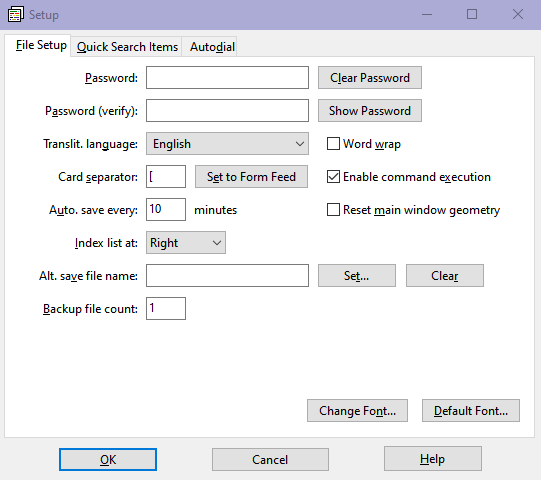
To make setup modifications to a notes file
- From the File menu, choose Setup....
- A dialog box with three tabs will open:
- In the File Setup tab there are 11 options,
described below:
- You can assign a password to your NTF file so that it will be saved in encrypted form. Please enter the same password in the two input boxes. You can use the Clear Password button to delete any password and the Show Password button to display the passwords in the input boxes.
- You can select the translit language to be used by some commands.
- You can specify whether text in the notes information area should be displayed with word wrap or not.
- You can specify the Card Separator character (the default is Form Feed) to be used when you save your file in TXT format. See the Save... command.
- If you want to disable command execution in NOTEFILE, you can deselect the Enable command execution option.
- If you want to save a copy of your file (with the
$$$extension) periodically, then you can specify the autosave period in minutes. To disable the autosave feature, set the period to 0 minutes. - If you want to resize the NOTEFILE window, the notes information area, and the notes index list to their default sizes, please check the Reset main window geometry check box before clicking OK.
- If you want to move the notes index list from right to left and the notes information area from left to right, you can select Left in Index list at.
- If you want, you can specify a path name for a
mirror
copy of your data file. If the Alt. save file name is specified, then a second copy of your data file will be created each time you save your notes file. This copy will be identical to the original file. This feature is intended for problems arising outside your usage with NOTEFILE, such as disk crashes or unintentional file deletions. So, it is advised to select your alternate save file name in another drive, preferably a networked computer or removable disk. - You can disable the creation of backup files or you can have 1 to 9 backup files by specifying a number between 0 and 9 in Backup file count. For more information, see the end of this topic.
- You can change the background color, the font color, and the font attributes used in both the notes information area and the notes index list by clicking on the Color & Font button and selecting the appropriate menu item from the displayed pop-up menu. Using the Change sub-menu item, you can select a custom background color, a custom font color, and any font family and attributes available on your system. The Default sub-menu items are used to revert these to the built-in defaults of NOTEFILE.
- The Quick Search Items tab can also be accessed using the Quick Search Items... command from the Search menu.
- The Autodial tab is used by the Autodial... command from the Card menu.
- In the File Setup tab there are 11 options,
described below:
After you change the file setup and attempt to close the file, NOTEFILE will prompt you to save the file. File setup information is saved only in NTF-formatted files.
Autosave files
The autosave feature is useful for periodically storing a copy of the notes file being edited in a temporary file in NTF format. If the file has a password, then the temporary file will also be stored in encrypted form. For more information see the Open... command.
Selecting the appropriate translit. language
The commands Copy ASCII and Change Case will use special information provided in the Translit File if it exists in the same directory as the NOTEFILE executable. Before using these commands, select the appropriate language in the File Setup dialog box, as described above in step 2-ii, to ensure correct behavior.
Error messages
- Passwords do not match!
- The passwords you enter in the Password and Password (verify) input boxes must be the same. You can check this by clicking Show Password.
- Card Separator must be a displayable ASCII character or the Form Feed character.
- The
Card Separator must be a single ASCII
character in the range
!to~or the Form Feed character (ASCII decimal code 12). Please do not use any international characters likeéöçφЖetc. - Autosave period must be a value between 0 and 99 minutes.
- The value of 0 will disable the autosave feature. To enable autosave, please enter a value between 1 and 99.
- Backup file count must be between 0 and 9.
- During a
Save or
Save As... operation, if the NTF or TXT file
being saved is going to replace a file with the same name, the old version
will be renamed to have the
BAKextension, so that it is kept as a backup file. However, a value of 0 in Backup file count will disable the creation of backup files. The default is 1, so that one version of a .bak file will be saved, just like the normal behavior of NOTEFILE before version 2.01. To enable having more than one backup file, enter a value between 2 and 9. The most recent backup file will have the extensionBAK; the others will beBK2,BK3, etc. Note that in Linux all extensions will be in lowercase.